Latest Post
Showing posts with label Software. Show all posts

Download Windows 7 Ultimate/Professional/Home Premium Here.


Four years before when i purchased an old PC i was asking some of my known persons to

 give me Windows XP cd so that i can reinstall XP but they refused. Today in my town i am well known for my largest collection of various software and Operating Systems. The best thing about these software are i have downloaded almost all of them. So today they asks me help out..
Many times you needs a OS Bootable cd/dvd to format your PC but you don’t have & your friend refuses to help. This is the time to make your own Windows 7 DVD without any deep knowledge, an Original Window DVD. Today I am posting Links to download Original Windows 7 ISO image. To install it in your pc you just have to burn that image on a DVD.
Visit the Links posted below & download the version according to your requirement…


Windows 7 : 32bit :


Windows 7 : 64bit


Note:  You will get Original Windows 7 SP1 ISO image from Microsoft Server. After Installing you will get standard Windows 7 Trial to crack trial click on Below Link.


Windows 8 : Download & Installation

Windows 8 is one of the most awaited operating system form Microsoft due to its faster Booting & much more rich Visuals. Touch support in PC is demand of new generation we can tell that it is starting of TAB PC Era That's why Microsoft extended touch support in every windows to every corner in Windows 8. To provide batter touch experience Microsoft providing Windows 8 Developer Preview to make market full of Windows 8 application before it’s official launching for everyday users. But as all of us can’t wait for launching we can test Windows 8 Developer Preview in our PC with some precautions.
Here are the direct download links for windows 8 Developer Preview from Microsoft official server

Windows 8 Developer Preview with developer tools : English : 64 Bit : 4.8 GB
Windows 8 Developer Preview : English : 64 Bit : 3.6 GB
Windows 8 Developer Preview : English : 32 Bit

System Requirements

The Windows 8 Developer Preview works great on the same hardware that powers Windows Vista and Windows 7:
  • 1 gigahertz (GHz) or faster 32-bit (x86) or 64-bit (x64) processor
  • 1 gigabyte (GB) RAM (32-bit) or 2 GB RAM (64-bit)
  • 16 GB available hard disk space (32-bit) or 20 GB (64-bit)
  • DirectX 9 graphics device with WDDM 1.0 or higher driver
  • Taking advantage of touch input requires a screen that supports multi-touch
  • To run Metro style Apps, you need a screen resolution of 1024 X 768 or greater

Download version according to your needs & Enjoy
 

Change MAC Address Of Your System With " Technitium MAC Address Changer "

Technitium MAC Address Changer helps you to change or spoof the Media Access Control (MAC) Address of your Network Interface Card (NIC) irrespective to your NIC manufacturer. It has a very simple user interface and provides all information regarding each NIC in the machine. Every NIC has a MAC address hard coded in its circuit by the manufacturer. This hard coded MAC address is used by windows drivers to access Ethernet Network (LAN). This tool can set a new MAC address to your NIC, bypassing the original hard coded MAC address. Technitium MAC Address Changer is a must tool in every security professionals tool box.

Features
  • Internet Protocol v6 (IPv6) support added.
  • Works on Windows 7 and Windows 8 for both 32-bit and 64-bit.
  • Automatic Update feature added to update software to latest available version.
  • Update network card vendors list feature allows you to download latest vendor data (OUI) from IEEE.org.
  • Enhanced network configuration presets with IPv6 support allow you to quickly switch between network configurations.
  • Command line options with entire software functionality available. You can select a preset from specified preset file to apply directly.
  • Issues in previous version ironed out.

DOWNLOAD


Protect Your Facebook, Gmail And Other Accounts From Hackers With Antilogger.

Zemana AntiLogger is a powerful, efficient, and lightweight app that blocks different hacking attacks. It detects any attempts to modify your computer’s settings, record your activities, Keep Watch to your PC’s sensitive processes, or inject malicious code in your system.
The AntiLogger is designed to work with any anti-virus. While an anti-virus software will protect you against a wide range of known forms of malware, the AntiLogger is able to stop advanced, new, and niche threats developed with a specific objective: to steal your private information or access your secure internet connections.
The free version of  Zemana AntiLogger is also available for download.

You Can Download Zemana AntiLogger Here
 

Download YUMI-0.1.0.7– Multiboot USB Creator For Windows.

DOWNLOAD

 YUMI (Your Universal Multiboot Installer), is the successor to MultibootISOs. It can be used to create a Multiboot USB Flash Drive containing multiple operating systems, antivirus utilities, disc cloning, diagnostic tools, and more. Contrary to MultiBootISO's which used grub to boot ISO files directly from USB, YUMI uses syslinux to boot extracted distributions stored on the USB device, and reverts to using grub to Boot Multiple ISO files from USB, if necessary.

DOWNLOAD


LogMeIn Hamachi

LogMeIn Hamachi is a hosted VPN service that securely connects devices and networks, extending LAN-like network connectivity to mobile users, distributed teams and business applications. You can easily create secure virtual networks on demand, across public and private networks. Hamachi is managed and maintained from anywhere via the web, securely


How To Make μTorrent Remote

Access to your µTorrent client. On any device.

What is uTorrent Remote?

μTorrent (uTorrent) Remote is a remote control that lets you access μTorrent running on your home computer-- from anywhere on the internet, including most mobile phones and tablets.
Steps To Setup uTorrent Remote Access:
1. Create an account from within your client.Follow the following procedure .

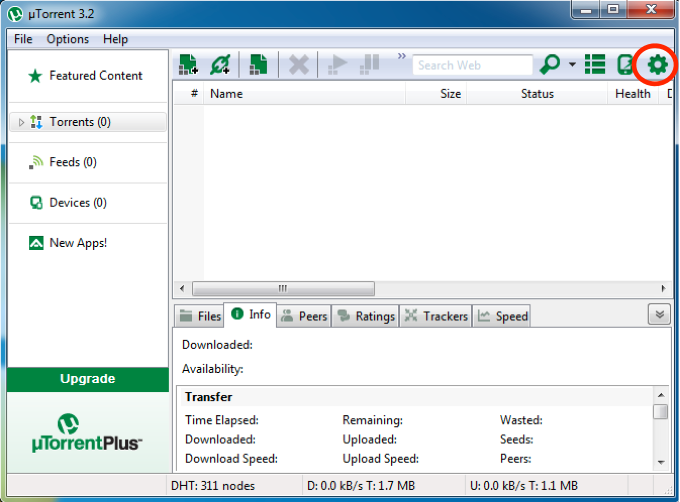
µTorrent Remote Access Preferences button in the µTorrent toolbar

Click the µTorrent Remote Access Preferences button in the µTorrent toolbar.
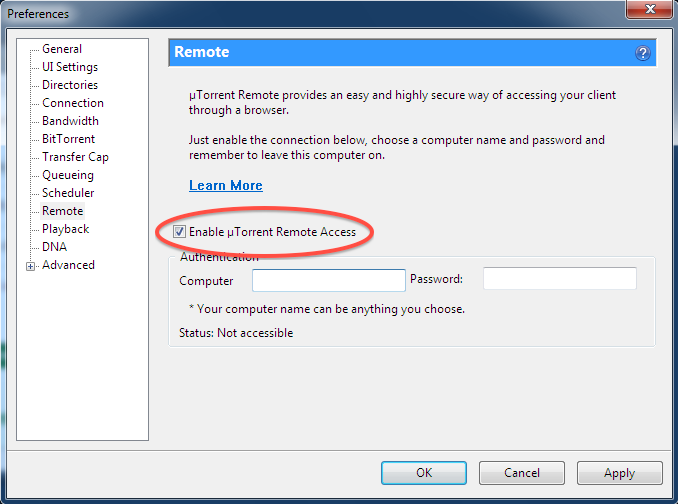
µTorrent Enable Remote Access in the µTorrent settings
Select the "Remote" section and check "Enable µTorrent Remote Access".
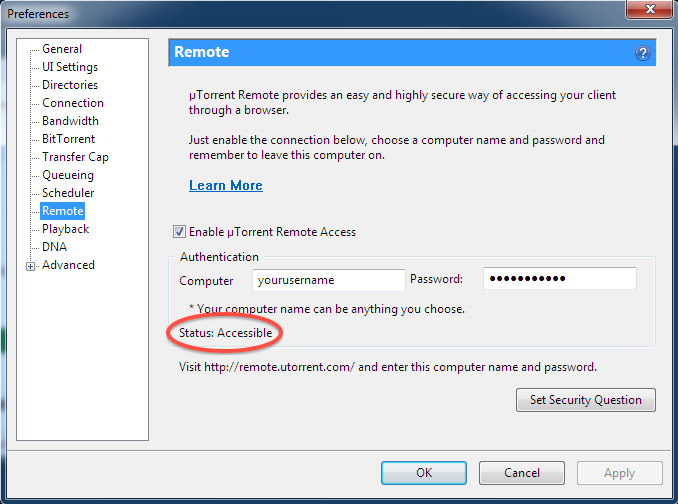
µTorrent Username and Password for Remote Access in the µTorrent settings
Choose a Computer name and password and enter it here. Click the "Apply" button. After a few seconds, you should see "Status: Accessible" or "Status: Registered". Close the preferences
2. Now go to the app or log in at https://remote.utorrent.com enter your user name or Computer name and password as provided in step 1, and you're done. There's no complicated network setup required.
Get Remote from any mobile device :
  • Android users: Install the μTorrent Remote Android app here.
  • Windows phone users: Install the μTorrent Remote Windows Phone app here.
  • iOS users and others: Log in directly to μTorrent Remote on your internet browser.  Go to https://remote.utorrent.com.

Third, log into Remote with the account you made in step one.
That’s it.   
 

µTorrent Download Free


DOWNLOAD  
Click here for Know About  µTorrent Remote


Features

Tiny

µTorrent is a little over 1 MB (smaller than a digital photo!). It installs ultra-fast with a light footprint on your computer, and runs super-efficiently.

Easy

Simple and straightforward – that's µTorrent. With its purpose-built interface, downloading torrents is a snap.

Accessible

Access µTorrent from anywhere with µTorrent Remote. Easily access your home clients securely (using ultra-private authentication and key-exchange).

Innovative

Since µTorrent is offered by the team who invented the BitTorrent open source protocol, you know you will always have access to the latest and greatest technologies.

Fast

Expertly designed for fast downloads. Avoids hogging valuable system resources, runs quietly in the background, and doesn't interfere with your work, play etc.

Cutting Edge

Incorporating groundbreaking µTP technology, µTorrent maximizes bandwidth and reduces congestion - so you have the smoothest, quickest downloads possible and don't make your internet connection slow to a crawl.

Intelligent

µTorrent is instinctively smart. It auto-adjusts bandwidth usage based upon your network and the Internet. Use Skype, play games, stream video etc., all without interference.

Plug-n-Play

µTorrent is a snap to install on your home network. In most cases, it's plug-n-play. We also use UPnP and NAT-PMP technologies to prepare your router for torrent access.
 

How to Easily Activate Windows 7 Using RemoveWAT


Activating Windows 7 can be a pain sometimes. So I have compiled this post to show you how exactly I activated my Windows 7 Ultimate using RemoveWAT. Although, the software, RemoveWAT can be used to activate all Windows 7 versions such as Windows 7 Ultimate, Enterprise, Professional, Home and Windows 7 Basic. RemoveWAT removes the ‘Windows not geniune’ message error completely from your PC and also allows you to download windows update. See below for it features.

RemoveWAT Features:
  • Requires no additional processes running afterwards.
  • 100% success rate.
  • Efficiently coded with safety checks to prevent damage to a Windows installation.
  • It has un-install option.
  • Complete removal of all genuine related elements.
  • No risk of bricking your bootsector or rendering your pc unbootable.
How to Use RemoveWAT to Activate Your Windows 7

1. Click the twitter button below to download RemoveWAT 2.2.6. Make sure you close your anti-virus program and stop your firewalls.
2. Launch the RemoveWAT software and click Remove WAT as seen below.

3. In the pop-up window that opens, click OK and wait till you see a success message.

4. After clicking OK, your PC will restart.

Note:  If you are using any Antivirus Program then Disable that antivirus program Before the Download and Installation of the RemoveWAT. After the Installation of  RemoveWAT you can Enable your antivirus Utility again .

After your PC must have been restarted, your Windows 7 will be activated and confirmed genuine.
 

Recuva

Accidentally deleted an important file? Lost something important when your computer crashed? No problem! Recuva recovers files deleted from your Windows computer, Recycle Bin, digital camera card, or MP3 player. And it's free!


DAEMON Tools Ultra

DAEMON Tools Ultra combines DAEMON Tools Pro key features, presenting functionality wrapped in simple usability.
This user friendly product allows you to mount not only image files but also virtual hard discs, helps you to work with ODD and HDD due to new integrated iSCSI Initiator. However we thought not only about functionality, but about practical software design. For your convenience main tools are now collected in friendly wizards for main disc image functions


Functionality

  • Mount disc images in *.mdx, *.mds/*.mdf, *.iso, *.b5t, *.b6t, *.bwt, *.ccd, *.cdi, *.bin/*.cue, *.ape/*.cue, *.flac/*.cue, *.nrg, *.isz
  • Convert all supported image formats to *.mdf/*.mds, *.mdx, *.iso
  • Make images of CD, DVD, Blu-ray discs
  • Make compressed disc images or split one image to several files
  • Protect disc images with password

VHD support

  • Create and mount read/write Virtual Hard Disk images with dynamic or fixed size
  • Use VHD images to back up any of your data
  • Have easy access to your data stored in VHD file

Media devices virtualization

  • Use "Quick Mount" option to mount and use up to 32 disc images right away
  • Set up to 32 SCSI and 4 IDE virtual devices in advanced mode


How to Recover Deleted Files In Windows With " Recuva "

Accidentally deleted an important file? Lost something important when your computer crashed? No problem! Recuva recovers files deleted from your Windows computer, Recycle Bin, digital camera card, or MP3 player. And it's free!


                                                             DOWNLOAD


  • Simple to use interface - just click 'Scan' and choose the files you want to recover
  • Easy to use filter for results based on file name/type
  • Simple Windows like interface with List and Tree view
  • Can be run from a USB thumb drive
  • Restores all types of files, office documents, images, video, music, email, anything.
  • Supports FAT12, FAT16, FAT32, exFAT, NTFS, NTFS5 , NTFS + EFS file systems
  • Restores files from removable media (SmartMedia, Secure Digital, MemoryStick, Digital cameras, Floppy disks, Jaz Disks, Sony Memory Sticks, Compact Flash cards, Smart Media Cards, Secure Digital Cards, etc.)
  • Restores files from external ZIP drives , Firewire and USB Hard drives
  • It's fast, tiny and takes seconds to run!
  •  

    Crack Windows Password Using Ophcrack


    Creating Bootable USB Ophcrack :

    Basic Requirements:

    ·         Windows Computer (Windows 7 is used here).
    ·         512 MB or larger portable device (USB stick).
    ·         Ophcrack XP or Vista Live CD.
    ·         tazusb.exe software. Download

    Steps To Creating Bootable USB Ophcrack :

    1.      Download and save a Correct version of  Ophcrack Live CD ISO.

           The latest version of ophcrack LiveCD is 3.6.0 (including ophcrack 3.6.0). There are two versions available:

               1.      Ophcrack XP LiveCD: cracks LM hashes (Windows XP and earlier)

              2.      Ophcrack Vista LiveCD: cracks NT hashes (Windows Vista and Windows 7/8)

    2.      Insert your USB Flash Drive

          Note : Make Sure that USB Flash Drive you are using is Formated Using FAT file system.


    3.      Download and run tazusb.exe then follow the following instructions 


    After this process finishes then your USB device is ready to use as windows password cracking TOOL.

    4.      Reboot your PC and set your BIOS boot menu to boot from the USB device

    If all goes well, you should be booting from the USB stick into a mini SLAX environment. Ophcrack is launched automatically after boot.
     

    Download Ophcrack Free


    What Is Ophcrack?

    Ophcrack is a free Windows password cracker based on rainbow tables. It is a very efficient implementation of rainbow tables done by the inventors of the method. It comes with a Graphical User Interface and runs on multiple platforms.


    Description
    ·         Opchrack can crack passwords for Windows 7, Windows Vista, and Windows XP.
    ·         Ophcrack can recover 99.9% of passwords from Windows XP, usually in a matter of seconds. Any 14-character or smaller password that uses any combination of numbers, small letters, and capital letters should be crackable.
    ·         Ophcrack can recover 99% of passwords from Windows 7 or Windows Vista. A dictionary attack is used in Windows 7 and Vista.
    ·         The Ophcrack LiveCD option allows for completely automatic password recovery.
    ·         LiveCD method requires no installation in Windows, making it a safe alternative to many other password recovery tools.
    ·         No Windows passwords need to be known to use the Ophcrack LiveCD to crack your Windows passwords.

    Features:

    ·         Software is freely available for download online
    ·         Passwords are recovered automatically using the LiveCD method
    ·         No software installation is necessary to recover passwords
    ·         No knowledge of any existing passwords is necessary
    ·         Ophcrack works with Windows 7, Windows Vista, and Windows XP
    Requirements :
    ·         Some antivirus programs mistakenly identify Ophcrack as a Trojan or virus (see Guide Review below)
    ·         506 MB (7/Vista) / 425 MB (XP) LiveCD ISO image must be downloaded
    ·         LiveCD ISO image must be burned to a disc before being used
    ·         Passwords greater than 14 characters can not be cracked
     

    YouWave

    YouWave with Activation Key


    YouWave  is a software which is used to run the android apps and games in your computer. Playing with the Android emulator on your computer is a pretty geeky endeavor, but YouWave makes it easy to accomplish on your Windows PC. If you can download and install a Windows program, you can have an Android virtual machine running on your desktop in just a few minutes. All without ever touching the SDK or Sun’s JDK. As a bonus, the Window it runs in has a really easy method of installing third-party apps from free Android applications stores, as well as apps downloaded to your PC.

    This is the best alternative for BlueStacks But YouWave won’t launch most of the games like Temple Run,Subway Surfers etc. while you can play them on BlueStacks.


    YouWave Features
    • Runs Android apps on your PC, no Android Device required
    • Download thousands of apps online via app stores in Youwave
    • High performance  than BlueStack
    • Easy to install
    How to Activate (No Crack is Required)
    1. Install the Latest version of YouWave Home Edition from http://youwave.com/download
    2. Launch and wait for Activate window
    3. Select “Enter Activation Key Below”
    4. Press OK after Entering Activation Key given below

    Activation Key

    WMCSTOUZRBOYWZHMTWWXVOBSWBFBUMiQRXBC


    BlueStacks App Player


    BlueStacks App Player lets you run apps from your phone fast and fullscreen on Windows and Mac.
    Over 5 million people around the world use top apps like WhatsApp , Angry Birds, and more on their laptops with BlueStacks. It took 10 engineers two years to build the complex "LayerCake" technology that enables this to happen – but you get to experience it free while in beta. 

    You can download BlueStacks App Player now at BlueStacks.com


    You can download BlueStacks App Player now at BlueStacks.com
     
     
    Support : BILAL SHAIKH | BILAL SHAIKH | ALL TECHNO GEEKS
    Copyright © 2011. All Techno-Geeks - All Rights Reserved
    Template Created by BILAL SHAIKH Published by ALL TECHNO GEEKS
    Proudly powered by Blogger